A single vendor ecommerce website is an online shop where one business sells its own products. There are no outside sellers, no commission and no split orders, just your brand, your stock and your buyers. This guide explains when this model is the right choice, what the site needs, how to plan payments and delivery in Bangladesh and how to choose the software.
It is written for shop owners moving from Facebook orders to their own website, and for brands that want full control of their sales.
What a single vendor ecommerce website is
In a single vendor shop, the owner controls everything: which products appear, the prices, the photos, the stock, the delivery and the returns. Every order belongs to one business. That makes the system simpler than a marketplace, where many sellers share one website and the platform must split orders, collect commission and pay each seller.
Most brand websites work this way. A clothing label, a gadget importer, a cosmetics brand or a home goods store all sell their own stock under their own name.
Single vendor or multi vendor?
The choice depends on who owns the products.
- Choose single vendor if you own or buy the stock yourself, set every price and handle every delivery.
- Choose multi vendor if other businesses will list their own products and you earn a commission on their sales.
Many owners pick a marketplace because it sounds bigger, then spend months approving sellers, settling payouts and resolving disputes they did not need. If you only sell your own goods, a single vendor ecommerce website keeps the work focused on products and buyers.
Can you change later?
Yes, but plan for it. Some shops start alone and invite partner brands later. If that is your plan, keep your product data clean and consistent, so it can move to a marketplace system when the time comes.
Why not just sell on Facebook?
Facebook and Instagram are good for finding buyers, but poor for running a shop. Orders arrive in messages, prices are asked again and again, stock is tracked in a notebook and nobody can see the order history.
Your own website fixes this. Buyers see prices and stock, order at midnight without waiting for a reply, pay on delivery or online and track their parcel. You keep a customer list that no platform can take away. Keep the social pages for reach, and send buyers to the shop to order.
Plan the catalogue
Before any design, list your products with names, categories, variants, prices, stock and photos. This list decides how your single vendor ecommerce website is organised.
Categories
Group products the way buyers shop. A general store might use Fashion, Electronics, Groceries, Home and Living and Beauty, each with a few sub-categories. Avoid dozens of tiny categories with two items each.
Variants
Sizes, colours and pack sizes should be variants of one product, each with its own price, stock and photo where needed. Buyers want to pick "Black, L" on one page, not search through six separate items.
Photos
Use real photos on a plain background, in the same shape for every product. Show the item from more than one side, and a close-up of the fabric, port or label where it helps.
Pages every single vendor ecommerce website needs
- Home with one clear banner, categories, offers and best sellers.
- Category and search pages with filters, sorting and a Load More button.
- Product pages with photos, variants, price, stock, delivery details, reviews and questions.
- Cart and checkout, short and clear.
- Order tracking for guests and account holders.
- Customer account with orders, addresses, wishlist and returns.
- Help, About, Return policy, Terms and Privacy.
Each page should answer one question. If buyers keep asking the same thing on WhatsApp, the answer belongs on a page.
Product pages that sell
The product page decides most sales. Put the price, the stock status and the buy button near the top. Show delivery time and charge beside the button. Add a short description, key details as a list, a size guide for clothing and shoes, and a video if you have one.
Reviews and questions build trust. Ask every buyer for a review after delivery, and answer product questions in public so the next buyer sees the answer. A badge such as "New" or "Best seller" helps a product stand out in a busy grid.
A WhatsApp button on the product page works well in Bangladesh. Many buyers want to ask one question before ordering, and a one-tap chat with the product link already filled in turns that question into a sale.
Checkout and payments in Bangladesh
A short checkout wins orders. Ask for a name, a phone number and an address with district and upazila. Do not force an account or an email before the first order; let buyers check out as guests with a phone check.
Payment options
- Cash on Delivery, still the first choice for many buyers.
- Send Money by bKash, Nagad or Rocket, with a transaction ID that you verify.
- A gateway such as SSLCommerz, or the wallets' own merchant services, for automatic payment.
Fake orders
COD shops face fake and prank orders. Ask for a small advance, such as the delivery charge, on risky orders, limit how many orders one phone number can place in a day and call new buyers before shipping large orders. A list of incomplete checkouts also helps: some of those buyers only need a call to finish.
Delivery and couriers
Set your delivery zones and charges before launch, usually inside Dhaka, outside Dhaka and your own area if you have riders. Show the charge in the cart, not as a surprise at the end. Free delivery above an amount raises the average order.
Steadfast, Pathao and REDX are the common couriers. A single vendor ecommerce website that books parcels from the order page and brings back the status saves hours of copying addresses. Print labels, record who packed each parcel and keep the tracking number on the order.
Returns and customer care
Write a return policy in plain words: which items can be returned, within how many days, who pays return shipping and how refunds are sent. Let buyers request a return from their order page with photos, review it and arrange pickup.
Answer messages quickly. A help page with the ten most common questions, a ticket system for order problems and a WhatsApp number for quick questions cover most needs. Send SMS updates when an order is confirmed, shipped and delivered to cut "where is my parcel" messages.
Marketing your own shop
- Flash sales and vouchers for launch week and festivals.
- Affiliates who share your products and earn a commission.
- SMS and email campaigns to past buyers.
- Facebook Pixel and Google Analytics to see which ads bring real orders.
- Product feeds for Facebook and Google shopping catalogues.
- A blog with buying guides that answer real questions.
Google's guide to helpful, people-first content explains why honest, useful pages earn more trust and search traffic than thin ones.
Choosing the software
There are four common routes to a single vendor ecommerce website:
- A hosted builder is quick but charges monthly, often with transaction fees and limited local payments.
- A blog platform with a shop plugin is flexible but can turn into a pile of plugins that break each other.
- A custom build fits exactly but costs the most and takes the longest.
- A self-hosted script on a modern framework gives you the source code, local payments and couriers, and no monthly fee.
A laravel ecommerce platform is a good middle path for many shops: the code is clean, developers are easy to find and it scales from a small VPS to a large server.
Questions to ask before you buy
- Does it support COD, Send Money and local gateways?
- Are Steadfast, Pathao and REDX built in?
- Can buyers check out as guests with a phone number?
- Are returns, refunds and support tickets included?
- Can you edit the homepage, banners and menus without code?
- Does it work well on a cheap phone?
- Do you get the full source code and updates?
Team and daily routine
Even a small shop runs better with a routine. In the morning, check new orders and verify Send Money payments. Before noon, confirm orders and call buyers for large COD orders. After lunch, pack, print labels and hand parcels to the courier or your rider. In the evening, answer messages, review returns and update stock for tomorrow.
Give each person a staff account with only the rights they need: the packer sees orders, the support person sees tickets and the owner sees money and settings. Roles prevent mistakes and make it clear who did what.
Hosting, speed and security
Host on a VPS or a good PHP host with SSL, daily backups and enough space for photos. Compress images before upload and keep the homepage to sections that sell. Test pages on mobile data, not office Wi-Fi.
Protect the admin side with strong passwords, two-factor sign-in and staff roles, so a packer sees orders but not money or settings. Keep an activity log and regular backups. A single vendor ecommerce website holds customer phone numbers and addresses, and buyers trust you to keep them safe.
Measure and improve
After launch, check a few numbers every week: orders per day, average order value, the share of repeat buyers, cancelled orders, COD parcels refused at the door and returns by product. Each one points to a fix. Many refusals from one area may mean a courier problem; many returns on one product may mean a wrong size chart or a misleading photo.
Look at the search terms that returned no results. They tell you what buyers expected to find and did not. Read every critical review and reply calmly; future buyers read your replies as closely as the reviews.
Change one thing at a time, such as a banner, a delivery charge or a product photo, and watch the numbers for a week. Small, steady improvements beat a full redesign every few months.
A launch checklist
- Your best 100 or more products with real photos, variants and stock.
- Delivery zones and charges set and tested.
- COD and one mobile payment tested with real small orders.
- A courier account connected and one test parcel sent.
- Return, privacy and terms pages written.
- WhatsApp and phone numbers on every page.
- Every page checked on a phone.
- A launch offer ready.
Launch to your existing followers first. Their orders and reviews make the shop look alive for everyone who comes after.
Building your shop with Kinbo
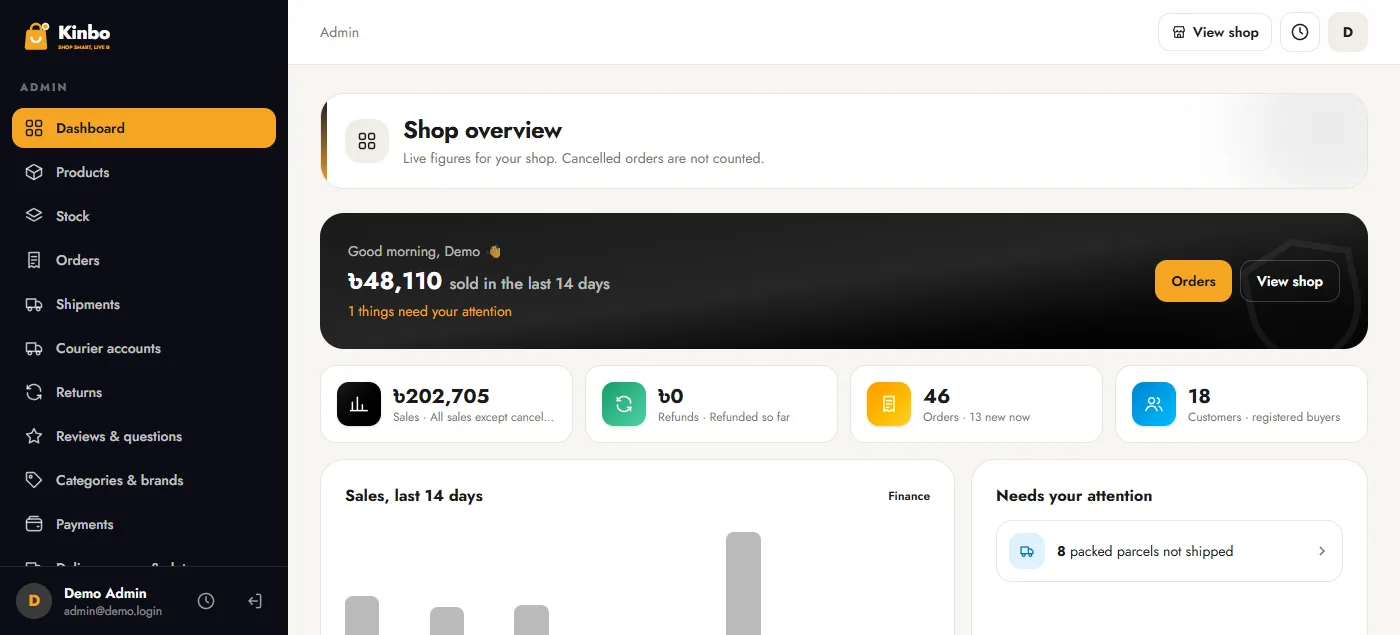
These parts come ready in Kinbo, the Laravel single vendor ecommerce PHP script. It has a large-catalogue storefront with live search, category sidebar, flash sale and product rails, product pages with variants, video, badges, size guides, reviews, questions and a WhatsApp button, and a phone layout with a bottom navigation bar.
Checkout takes district and upazila addresses and guest orders, with Cash on Delivery and optional advance, Send Money with proof, and SSLCommerz, bKash and Nagad gateways. Steadfast, Pathao and REDX courier booking, returns, refunds, tickets, vouchers, campaigns, affiliates, a blog and a homepage builder are included, all on a laravel ecommerce platform you host yourself.
Frequently asked questions
What is a single vendor ecommerce website?
An online shop where one business sells only its own products, with no outside sellers or commission.
Is a single vendor ecommerce website cheaper to run than a marketplace?
Usually yes. There is no seller approval, payout handling or dispute work between sellers, so a smaller team can run it.
Can buyers pay cash on delivery?
Yes. COD is standard in Bangladesh, often with a small advance on risky orders to stop fake ones.
Which couriers can I use?
Steadfast, Pathao and REDX are common, and many shops also use their own rider inside the city.
Do I still need Facebook?
Yes, for reach. Use your pages to find buyers, then send them to your website to order and track.