A tailor shop website design template should look calm, show your craft and make it easy to book a fitting. People who go to a tailor do not hunt for discounts. They look at the lapel, the stitching and the cloth, and then they want to talk to someone. Your website has to do that job before they ever walk in.
This guide explains how to plan a website for a tailoring house in Bangladesh, from the pages and the homepage to photos, services, online sales and launch. It works whether you make suits, panjabis, blouses or wedding wear.
What a tailor shop website design template must do
A tailoring business sells skill, time and trust. A good tailor shop website design template shows these three things clearly. It should also support the way tailors really work: appointments, measurements, alterations and made-to-measure orders.
Check that the template offers these basics:
- Large photo areas, so garments and fabric can lead the page.
- A services section for alterations, appointments and made to measure.
- A place to tell your story and show your workshop.
- Product pages with size guides, if you also sell ready pieces.
- Clear contact details, a map and a booking route.
- Fast pages on a phone.
- Payments and courier delivery if you sell online.
If the design is crowded with banners and flashing sale tags, it will not match the quality of your work.
Decide what your website will do
A tailor shop website design template is only a starting point, so the goal comes first. Not every tailor needs an online shop. Decide the main goal before you pick a design. There are three common goals:
- Show your work and get enquiries. The site is a portfolio with a contact form and a phone button.
- Book appointments. Customers choose a service and ask for a time. You confirm by phone or message.
- Sell ready pieces online. You list suits, scarves, bags or ready-made clothes with prices and delivery.
Many tailors combine the three. They show their craft, take fitting requests and sell a small range of ready items. Start with the first goal and add the others when you are ready. You can always add a shop later.
Pages for your tailor shop website design template
Keep the structure simple. These pages cover most needs:
- Home: a strong photo, your main services and a way to contact you.
- Collections or gallery: your best work in clean photos.
- Services: what you offer, how long it takes and roughly what it costs.
- About or atelier: your story, your cutters and your workshop.
- Shop: ready pieces with prices, if you sell online.
- Size guide: how to measure and how fit works.
- Delivery and alteration policy: in simple words.
- Contact: address, map, phone, WhatsApp and opening hours.
Write each page for a real customer. Imagine a man who needs a suit for his brother's wedding in three weeks. He wants to know if you can do it, what it costs and where to go. If your pages answer these three questions in under a minute, they are doing their job.
Add a journal later with posts on fabric care, wedding fashion or how to choose a suit. These can bring in new visitors from search.
Shape a homepage for a tailor shop website design template
The homepage should feel like walking into a quiet showroom. Leave space around photos and use few words.
A simple order for the blocks
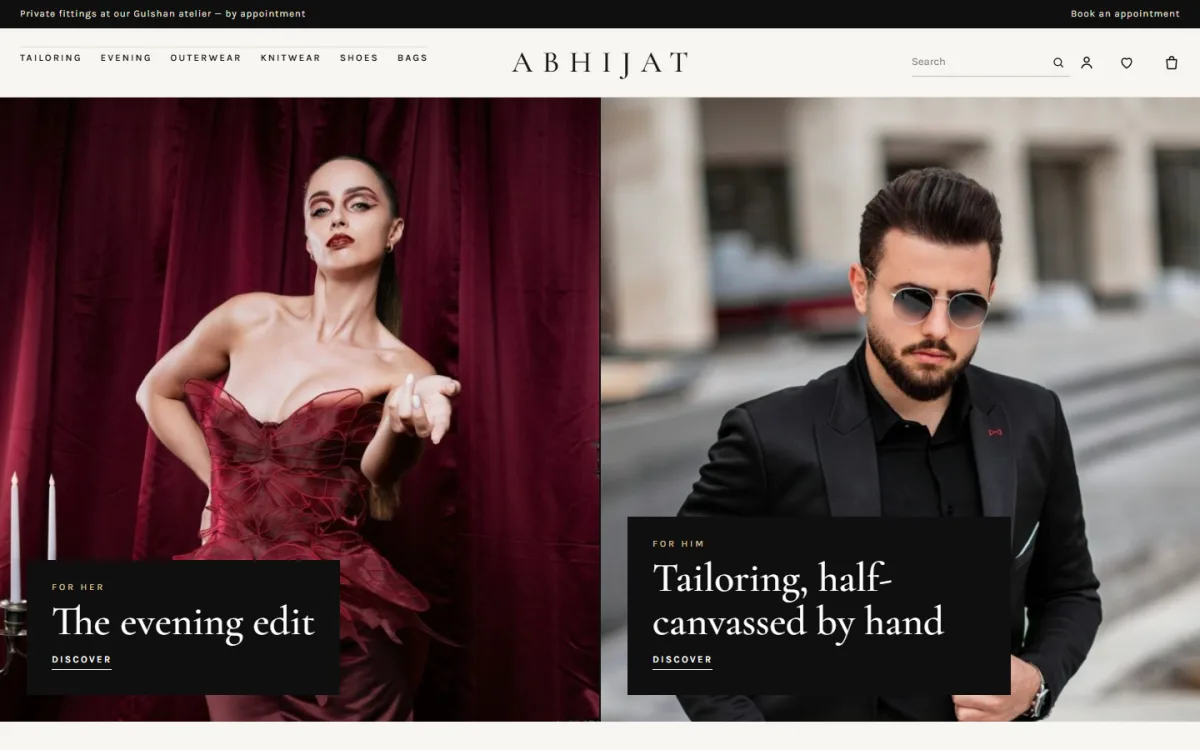
- A hero with one or two large photos. For a house that serves both men and women, split the screen in two halves.
- Three tall collection cards, each with a title and one line.
- A new season block with eight pieces at most.
- A quote band: a line from your head cutter or a loyal client, with a button.
- Your story, with a photo, a short note and a signature.
- Three services: for example alterations, appointments and made to measure.
- Most requested pieces in tabs.
- Client reviews.
- Recent journal posts.
Ten blocks are plenty. A calm homepage tells the visitor that you are careful with details.
Show your craft with good photos
Photos matter more for a tailor than for almost any other business. A client wants to see the lapel, the shoulder line and the fabric.
- Shoot in daylight with a plain background.
- Show the front, the back and a close-up of the stitching or buttons.
- Use photos of real work in your workshop: cutting, pinning, pressing.
- Take a clear photo of each fabric you stock, near a window.
- Use the same shape for all photos. A 3:4 portrait shape suits garments.
- Include one photo of you or your head cutter. People trust a face.
Resize every photo before uploading. Large files slow the page and cost you visitors on mobile data.
Explain your services clearly
Customers often do not know how tailoring works. A short, plain services section removes doubt.
What to describe for each service
- What is included, in one or two lines.
- How many fittings are needed.
- How long it takes, for example "ten to fourteen days".
- A starting price or a price range.
- How to book: phone, WhatsApp or form.
The three questions every tailor hears are about alterations, appointments and made to measure. Answer these first. If your prices vary a lot, say "from" and give the lowest price.
Take appointments without confusion
Most tailors take appointments by phone. A website can make that easier, even without a full booking system.
- Add a button on every page: "Book a fitting".
- Link it to a short form: name, phone, service, preferred day.
- Show your opening hours and closed days.
- Add a WhatsApp button for quick questions.
- Reply the same day, even if it is only to confirm you got the request.
Keep the form short. Each extra field costs you enquiries.
Decide who answers the messages and how fast. A tailor who replies within a few hours looks careful. One who replies after three days looks busy in a bad way. If you cannot reply fast, say so on the page: "We reply within one working day."
Selling ready pieces online
If you also sell ready suits, shirts, scarves or leather goods, you need proper shop pages. Tailor shop ecommerce website design has some special points.
- Show size guides for men's tailoring and women's sizes.
- Show fabric and care instructions, which matter for wool and silk.
- Show delivery charges and delivery time.
- State your exchange rules, including what happens if a size does not fit.
- Offer alteration after purchase if you can. It builds trust and sets you apart from a factory brand.
Offer the payment methods your buyers use: bKash, Nagad, card payment through a gateway such as SSLCommerz, and cash on delivery. For delivery, use a courier with tracking, such as Steadfast or Pathao, and add a track order page.
Think about returns before you list anything. Ready-made pieces can be exchanged, but made-to-measure items cannot. Say this clearly on each product page, so there is no argument later. If you offer free small alterations on ready pieces, mention it too, because it is a real advantage over a factory brand.
Prepare for wedding and Eid seasons
Tailors have busy seasons, and orders must be planned well ahead.
- Set a last order date for each season and show it on the homepage.
- Explain how many weeks a made-to-measure order takes in peak season.
- Limit the number of orders you accept, so you never miss a deadline.
- Send customers a message at each stage: cutting, first fitting, finishing, ready.
- Book fittings early, since the best slots go first.
Measurements and fit
Explain how measuring works. Tell customers if you will measure them at the shop, or if they can send measurements from home. Give a simple guide with a photo or drawing for chest, waist, shoulder and sleeve. Remind them to ask a friend to help, since measuring yourself often goes wrong. Keep a customer record so a returning client does not need to be measured again.
A tailor who says "no" honestly is trusted more than one who promises everything and delivers late.
Keep the site fast and simple
- Choose a light theme and avoid page builders with many effects.
- Load images lazily and resize them first.
- Use one or two fonts, or system fonts.
- Keep animations gentle and optional.
- Choose reliable hosting.
- Test the site on a mid-range phone, on mobile data.
Before you add any effect, ask if it helps a client book a fitting or understand your work. If not, leave it out. A fast, plain site feels professional. A slow, heavy one makes even good work look careless.
A ready-made option for tailoring houses
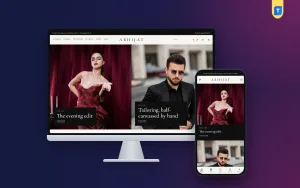
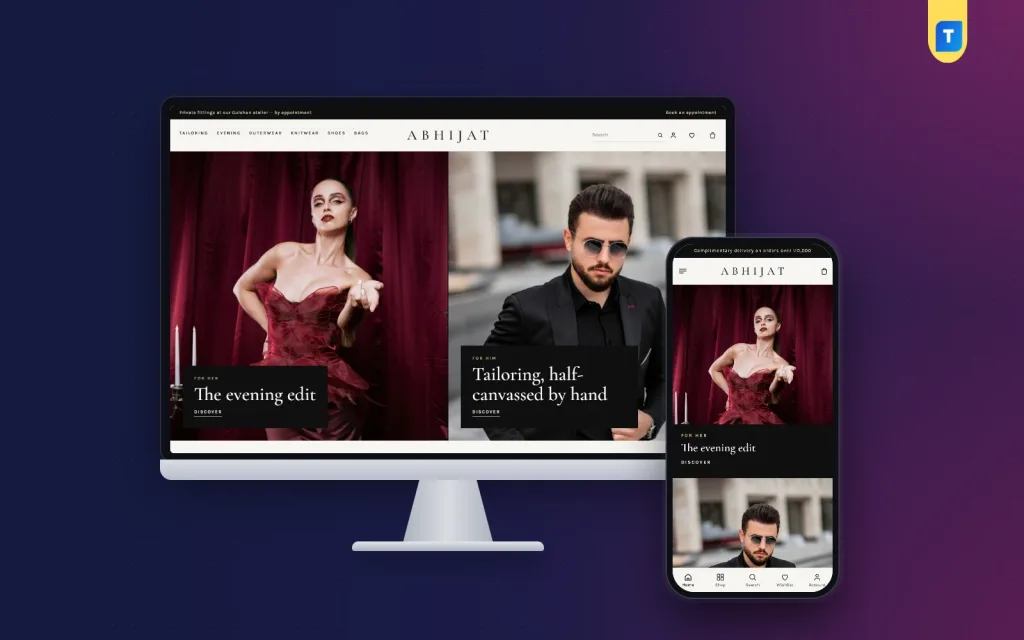
If you want a theme made for this type of business, Abhijat is one option. It is a WordPress theme for premium tailoring and eveningwear houses, with suits, dinner suits, gowns, coats, knitwear, shoes, leather bags and silk scarves. It uses paper-coloured pages, ink-black type and a thin gold line.
Facts that match the points above:
- 10 homepage blocks you can hide or re-order.
- A two-half hero with black caption strips.
- Three tall collection cards, a quote band and an atelier story block.
- A services block for alterations, appointments and made to measure.
- Centred product cards with a second photo on hover.
- Size guides for men's tailoring and women's sizes.
- Sign in popup and a one-page checkout.
- bKash, Nagad, SSLCommerz, cash on delivery and Steadfast or Pathao courier.
- Four palettes, five font pairs and a one-click demo with 49 pieces.
The shop runs on a plugin that comes with the theme, so you do not install WooCommerce. You can see the live demo and the admin panel here: view Abhijat. Compare any theme, including this one, with the checklist below.
Common mistakes to avoid
- Stock photos. They look the same everywhere. Use your own work.
- No prices at all. Customers leave if they cannot guess the cost.
- Too many popups and banners. They clash with a calm brand.
- No phone number on the page. Tailoring is personal, so calls matter.
- Old information. Update hours, prices and holiday notes.
- Long forms. Ask only for what you need.
- Tiny photos. A small photo hides the stitching that makes your work special.
Launch checklist
Take your time with the launch. Ask two friends who have never seen the site to try it and tell you what confused them. Their answers are worth more than any guess.
- Place a test order and send a test enquiry.
- Check the confirmation messages.
- Open the site on two phones and one laptop.
- Proofread every service, price and size table.
- Click all buttons and menu links.
- Check the map and the opening hours.
- Publish your alteration, exchange and delivery policy.
- Add phone, WhatsApp and social links to the footer.
- Take a backup before you announce the site.
After launch, share the link on your Facebook page and in your shop. A card at the counter with a small web address helps too. A good tailor shop website design template gives you the frame, but your photos and your honest text give it value.
If you want to read more on the technical side, the official WordPress documentation is a good, reliable reference.
Frequently asked questions
What should a tailor shop website design template include?
It should include large photo areas, a services section, an about page, a booking route, clear contact details and fast mobile pages. Add a shop only if you sell ready items.
Can a tailor sell made-to-measure clothes online?
Yes. Describe the process, list the measurements you need and explain the fittings. Many tailors take the order online and confirm the measurements by phone or at a fitting.
Do I need WooCommerce for a tailor shop on WordPress?
No, not always. Some themes carry their own shop system. Abhijat includes one, so payments and couriers work without extra plugins.
Is tailor shop ecommerce website design different from other fashion shops?
A little. Tailoring pages need more focus on fabric, fit, appointments and alterations, and a calmer look than a discount-led fashion store.
How many photos do I need?
Start with 15 to 20 strong photos of your best work, plus a few of your workshop. Clear photos beat a large number of weak ones.
Should I show prices on the site?
Yes, at least a starting price or a range. It saves time for you and for customers who cannot afford a service.