Tech store website design has one hard problem that a clothes shop never faces: the buyer often does not understand the product. A smart plug, a mesh router or a fitness band comes with unfamiliar words, and people hesitate when they do not understand. Your website has to explain, compare and reassure, all in a few taps.
This guide covers the full job for a small shop in Bangladesh, from choosing a layout to setting up bKash, Nagad and cash on delivery. Follow the steps in order, use the checklists, and you will have a shop that is clear to visitors and easy for you to run.
What makes a tech shop different from other online shops
In a fashion shop, the buyer looks and decides. In a tech shop, the buyer reads, compares and worries. Three things set it apart.
- Specs decide the sale. Size, power, battery life and compatibility matter more than colour.
- Risk feels high. The price is larger, fakes exist and repairs are hard.
- Products work together. A smart bulb needs an app, a hub or a plug. Buyers need help seeing the whole setup.
So your site must teach a little, prove a little and make buying easy. Keep those three jobs in mind through every step below.
Start with a clear plan for your tech store website design
Good tech store website design starts on paper, not on screen. Spend an afternoon answering these questions.
- What exactly do you sell? Smart home items, audio, wearables, power and charging, or a mix.
- Who buys: young professionals, parents, students, gift shoppers?
- What is your average order value today?
- Which three products make you the most profit?
- Where do your customers come from now: Facebook, walk-ins, word of mouth?
Write the answers in one page. This page is your design brief. When you later choose a theme or brief a developer, you will know what you need, and you will not pay for features you will never use.
Organise categories around how people shop
Shoppers think in needs: "something to charge my phone faster", "a gift for my brother", "a camera for the front door". Name and group your categories in a way that matches those thoughts.

A simple category set for a smart gadget shop:
- Smart home
- Audio and screens
- Wearables
- Power and charging
- Small helpers for daily life
- Gifts
Keep it to six or eight. Add a prominent search box and filters for price and brand. A "gifts" category with a budget filter is a smart extra, because many tech sales are gifts.
Sell the setup, not just the single item
A smart bulb alone is a small sale. A bulb, a plug, a camera and a doorbell for the same flat is a real order. The trouble is that shoppers cannot picture the full setup from a plain product grid.
You can fix this with ideas that show products in context:
- Room scenes: a bedroom, a living room, a kitchen, a front door, each with the devices that suit it.
- Starter kits: three or four items that work together at a fair price.
- "Works with" notes on product pages.
- A running total, so buyers see what the full setup costs.
Customers who see a complete setup tend to add more to the cart. They also make fewer wrong choices, because the items already fit together.
Keep the starter kits easy to build. A simple set for a flat could be a smart plug, a bulb and a small camera, sold at one clear price. Name the kit by the need it meets, for example "Safe home starter", so a buyer understands it at once.
Design the home page for easy decisions
The home page should send people toward a product within two taps. Use this order of blocks:
- A short banner with one offer.
- Category tiles with pictures.
- A setup or room planner block, if you sell smart home items.
- Best sellers with key specs on each card.
- A deals row with a countdown and a stock bar.
- A gift finder by person and budget.
- Reviews and trust points.
- Latest tips from your blog.
Keep colours calm. Soft pastels or a clean dark theme make electronics look neat. Strong contrast on buttons helps mobile users tap the right thing.
Do not copy a big-brand layout. Small shops win with clarity and friendly help, not with copied style.
Product pages for tech store website design that convert
This is where the sale is won. Treat each page as a short, honest sales talk.
Put these items on every page:
- A title with brand, model and one key fact.
- Sharp photos from several angles, plus one in use.
- A specification table in two columns.
- Warranty length, who gives it, and how to claim.
- An expected delivery date or a clear delivery time.
- What is in the box.
- Compatibility notes: phone systems, voltage, plug type.
- Stock status and price in taka.
Write short lines. "Wi-Fi 2.4 GHz, 10 A, works with Android and iPhone" is easier to scan than a paragraph. If something does not work with a common device, say so. A buyer who is told the truth comes back; one who is surprised asks for a refund.
Photos, speed and mobile first
Most Bangladeshi shoppers browse on a phone, and many are on mobile data. Treat speed as part of your tech store website design from day one, because a slow page cannot be rescued by good looks.
- Resize every image before upload, aiming for under 150 KB on listing pages.
- Use a plain, bright background for product shots.
- Limit the number of blocks on the home page.
- Make buttons wide enough for a thumb.
- Avoid auto-playing video on the home page.
- Test on a low-cost Android phone.
A page that opens in three seconds keeps most visitors. A page that takes ten loses most of them.
Short guides that help buyers
A few helpful posts on your own site answer the questions people type into Google. Good topics for a tech shop:
- How to pick a power bank for your phone.
- What a smart plug does and who needs one.
- Wired or wireless earbuds: a simple comparison.
- How to set up a smart bulb in five minutes.
Each post should end with links to the matching products. Write in plain words, and keep every guide under a thousand words.
Payment and checkout that fit Bangladesh
Offer the methods your buyers use already.
- bKash and Nagad for mobile wallet payments.
- SSLCommerz for card and bank payments.
- Cash on delivery for those who want to see the item first.
Cash on delivery has a cost when parcels come back. Many shops ask for a small advance on expensive items, paid by bKash or Nagad, and keep COD for cheaper ones. Say this plainly at checkout.
Keep the form short: name, phone, address, district. Allow guest checkout. A one-page checkout works better than a long chain of steps.
Delivery, tracking and returns
Delivery turns a nervous buyer into a repeat buyer when it goes well.
- Pick one or two couriers. Steadfast and Pathao are common for small shops.
- Set flat charges for inside and outside Dhaka.
- Show delivery days on each product page.
- Send a message when the parcel leaves.
- Offer an order tracking page.
- Write a simple return rule: how many days, what condition, who pays shipping.
Be honest about delays. One short message beats ten angry calls.
Warranty and trust pages
Tech buyers want to know what happens if the item fails. Good tech store website design answers this before the buyer asks. Add these pages and link them in the footer:
- Warranty policy, with the length for each product type and how to claim.
- Return and refund policy, with the number of days.
- About us, with your shop address, a photo of the shop and your phone number.
- Contact, with phone, WhatsApp or Messenger links.
- Privacy and terms.
Add real customer reviews with photos where you can. Ask happy buyers to send a short message and a picture, then publish it with their permission. A review from a real person in Chattogram or Sylhet does more than any slogan.
Also keep your warranty slips and invoices tidy. When a buyer writes about a fault, you can answer in minutes, and that fast answer is itself a selling point for your shop.
Gift shoppers: a smart gadget shop ecommerce website design opportunity
Gifts are a big share of tech sales around Eid, birthdays, weddings and exam results. A gift shopper often does not know the product at all. They know a person and a budget.
A good smart gadget shop ecommerce website design helps them with a gift finder:
- Ask who the gift is for: mother, brother, friend, colleague.
- Ask for a budget with a simple slider.
- Show five or six suitable items.
- Offer gift wrapping and a message card as an add-on.
This feels like talking to a helpful salesperson, and it brings in buyers who would otherwise leave without a purchase.
A ready-made option: Chomok
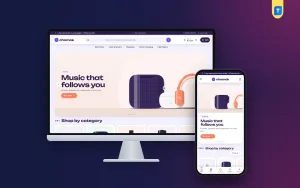
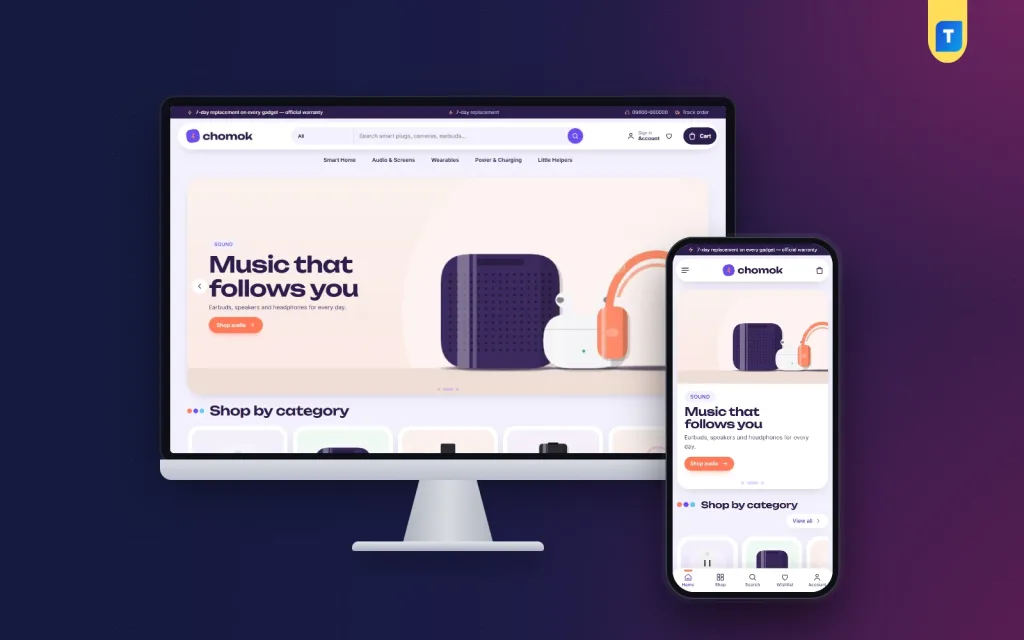
If you do not want to build every block yourself, start from a finished theme. Chomok is a WordPress theme made for smart gadget shops that sell smart home items, audio and screens, wearables, and power and charging gear.
From its feature list:
- A smart room planner with four drawn rooms.
- Device hotspots shoppers tap to build a setup, with a live total and an add-all button.
- A gift finder by recipient and a budget slider.
- Product pages with specifications, warranty and delivery date.
- 24 homepage blocks you can switch and re-order.
- Gadget deals with a countdown and stock bars.
- A floating capsule header, pill buttons and five pastel palettes.
- bKash, Nagad, SSLCommerz and cash on delivery.
- Steadfast and Pathao courier support with order tracking.
- A one-click demo with 23 products from 4 brands.
It is a theme, so you still bring your own products, photos and policies. What it saves is the layout work for a smart gadget shop ecommerce website design that sells setups.
Theme or custom build: how to choose
Both can work. Compare them on cost, time and control.
A ready-made theme:
- Costs less and goes live in days.
- Lets you change text, colours and blocks yourself.
- Is a sensible first shop.
A custom build:
- Costs more and takes weeks or months.
- Suits unusual needs, such as stock sync with a warehouse system.
- Makes you depend on the developer for later changes.
For tech store website design on a modest budget, most small sellers should begin with a theme. Learn what your customers ask for in the first three months, then decide whether custom work is worth paying for.
Most sellers who start this way are happy with the choice. You can see how the Chomok demo feels on your own phone before you decide anything.
Launch checklist for tech store website design
Use this list before you tell anyone the shop is open.
- Place a test order with every payment method.
- Check that the confirmation email and the admin notice both arrive.
- Open every key page on a cheap phone.
- Check all prices, specs and spelling.
- Search five product names and check the results.
- Check delivery charges for two districts.
- Call your contact number to confirm it works.
- Publish warranty, return and delivery pages.
- Turn on SSL and set a weekly backup.
After launch, review the numbers each week. Find pages with many visits and few sales, and fix those first.
Mistakes to avoid
- Listing items with no specs.
- Using manufacturer photos on every product.
- Hiding warranty terms.
- Forcing sign-up before checkout.
- Filling the home page with moving banners.
- Leaving out-of-stock items looking available.
If you want to read more on the technical side, the official WordPress documentation is a good, reliable reference.
Frequently asked questions
How long does tech store website design take?
With a ready-made theme, a small shop can open in one to two weeks. Most of that time goes on photos and product text. A custom site takes longer.
What should tech store website design include first?
Start with clear categories, spec-rich product pages, warranty details and a short checkout. Add extras such as a gift finder and reviews afterwards.
Do I need a blog on my shop site?
It helps. Short guides, such as how to pick a power bank, bring in searchers and build trust. Write only when you have something useful to say.
Is smart gadget shop ecommerce website design different from a general shop?
Yes. It needs spec tables, compatibility notes and ways to show devices working together. A general shop layout often lacks these.
Which payment methods are best?
Offer bKash, Nagad, a card gateway and cash on delivery. Use a small advance on costly items to lower returns.
How do I handle fake or wrong orders?
Confirm high-value orders by phone, take a small advance and keep a list of repeat problem numbers.