Website design for pharmacy shops is different from any other kind of shop site, because the customer is often worried, in a hurry, or buying for someone they love. They need to find the right medicine quickly, see an honest price and trust the shop behind the screen. Design that supports these needs will bring regular customers back every month.
This guide walks through the full process for a neighbourhood chemist: structure, product pages, price comparison, repeat orders, payments, delivery and common mistakes. The examples fit Bangladesh. Use the checklists as a briefing for your developer or as a plan if you build the site yourself.
A note on rules. Selling medicine is regulated. Check the current rules of the drug authority, DGDA, and your own licence terms before you sell anything online. This article is not legal advice.
Know your customers before you design
The best family chemists know their customers by name. They know who takes blood pressure tablets, who buys baby syrup and who comes for vitamins in winter. A website cannot replace that, but it can copy some of the warmth.
List your main customer types:
- Regular patients: older customers with monthly medicine for blood pressure, diabetes or heart care.
- Young parents: baby syrup, ORS, diapers, fever medicine.
- Busy workers: pain relief, vitamins, personal care.
- Family helpers: a son or daughter ordering for parents who live elsewhere.
Each group has different needs. Regular patients want repeat orders. Parents want speed. Family helpers want clear confirmation. Keep these in mind through every step.
Website design for pharmacy: the structure that works
A clean structure helps people find what they need without thinking. Keep the main menu short and use plain labels.
- Medicines: divided by use, such as fever and pain, stomach, cold and allergy, diabetes, heart and BP.
- Vitamins and supplements.
- Mother and baby.
- Personal care.
- Home health devices: thermometers, BP monitors, glucose meters.
- Upload prescription or order by phone.
- Contact and shop details.
Search should sit at the top of every page. Add shelf-style category tiles on the homepage so that people can see the main groups at a glance. Do not bury the contact number in the footer only.
Give the site a warm, friendly look
Clinical white and blue suits large hospitals. A neighbourhood chemist can look warmer. Soft green, peach and cream, with a rounded font, feel closer to a shop where staff know your name. Photos on wooden shelves and a friendly footer shape also help.

Some design points for any family pharmacy:
- Use only two or three main colours.
- Choose a rounded, easy font and keep body text large.
- Make buttons big and give them the same style everywhere.
- Show a real photo of your shop front and your pharmacist.
- Avoid flashing banners, countdowns and loud sale labels.
Good website design for pharmacy owners balances warmth with order. Warmth does not mean clutter. Leave space between sections and keep the first screen simple.
Build product pages that are clear and safe
A product page must be accurate, and it must be easy to read. Wrong strength or pack size can cause harm, so treat the page like a label.
Include these fields:
- Brand name and generic name together.
- Company name and form, such as tablet, capsule or syrup.
- Strength and pack options with a price for each.
- Price per unit.
- A clear Rx mark and a short notice for prescription items.
- A medical disclaimer that points to a doctor's advice.
- Delivery date or estimate.
Do not add claims that the pack itself does not make. Stay with facts: what the product is, who makes it, how it is packed and what it costs. For anything personal, the customer should ask a doctor or your pharmacist.
Show a fair price by price per unit
Regular customers often ask which company's version of the same generic medicine is cheaper. A good price comparison section answers on screen, and it builds trust, because you are being open about prices.
Here is how to do it simply:
- Pick a generic name, for example paracetamol or omeprazole.
- List every company's tablet or capsule version you stock.
- Show the pack price and the price per unit side by side.
- Sort the list from the lowest price per unit to the highest.
- Add a small "best value" tag on the cheapest version.
Be careful with wording. A lower price does not mean a medicine is right for everyone. Add a line saying the choice belongs to the customer and their prescriber. Show prices only; do not tell people to swap what a doctor wrote.
Design for monthly refills
For many pharmacies, repeat orders are the steadiest income. A customer on a long-term tablet buys the same item every month. If your site makes this easy, they will come to you instead of walking to the shop next door.
Ideas that help regular customers:
- A refill calculator: enter the daily dose and the number of packs, and see the monthly bill.
- A saved list of regular medicines for each customer.
- A reminder by SMS or WhatsApp a few days before the pack runs out.
- A "reorder this" button on past orders.
- A note field so the customer can mention changes from the doctor.
Keep the pharmacist involved. A refill is easy, but prescription items still need the usual checks.
Medical store ecommerce website design: features to check
If you plan to sell online, your medical store ecommerce website design needs more than a normal shop cart. Here is a short feature list to check, whether you build custom or choose a theme.
- Strength and pack variations with separate stepped prices.
- Fields for generic name, company, form and units per pack.
- Prescription marking and ordering by WhatsApp or phone.
- Price comparison and per-unit price.
- Product disclaimers and delivery estimates.
- Category tiles that you can reorder.
- Checkout with mobile payment and cash on delivery.
- A layout that works on small phones.
General shop themes lack most of these. You can add them with plugins and custom fields, but it takes time and testing. A pharmacy-focused theme gives you the fields on day one.
Payments and delivery for medicine orders
Customers in Bangladesh expect quick, familiar payment options. For a chemist, a short list is best.
- bKash and Nagad for fast, simple payment.
- Card payment through a local gateway such as SSLCommerz.
- Cash on delivery for neighbours and trusted customers.
Use a one-page checkout with name, phone, address and delivery area. Add a note field for a landmark. Ask for the phone number first, so your team can call if something is unclear.
State your delivery rules in plain words. Many chemists deliver the same day within their area and use a courier for other places. Show the charge, the hours and what happens if nobody answers the door. Medicine that needs cool storage should only go to areas you can reach quickly.
Website design for pharmacy on mobile phones
Most orders will come from a phone, often late in the evening. Test every screen on a small, mid-range Android phone before launch.
- Search is visible without scrolling.
- Buttons are large enough for a thumb.
- Pages open in about three seconds on mobile data.
- Text is readable without zooming.
- The WhatsApp and call buttons work with one tap.
- Checkout can be finished with one hand.
Compress your photos. Avoid heavy sliders and video on the homepage. Fast pages feel more trustworthy, and medicine is not something people want to wait for.
A ready-made option for family chemists
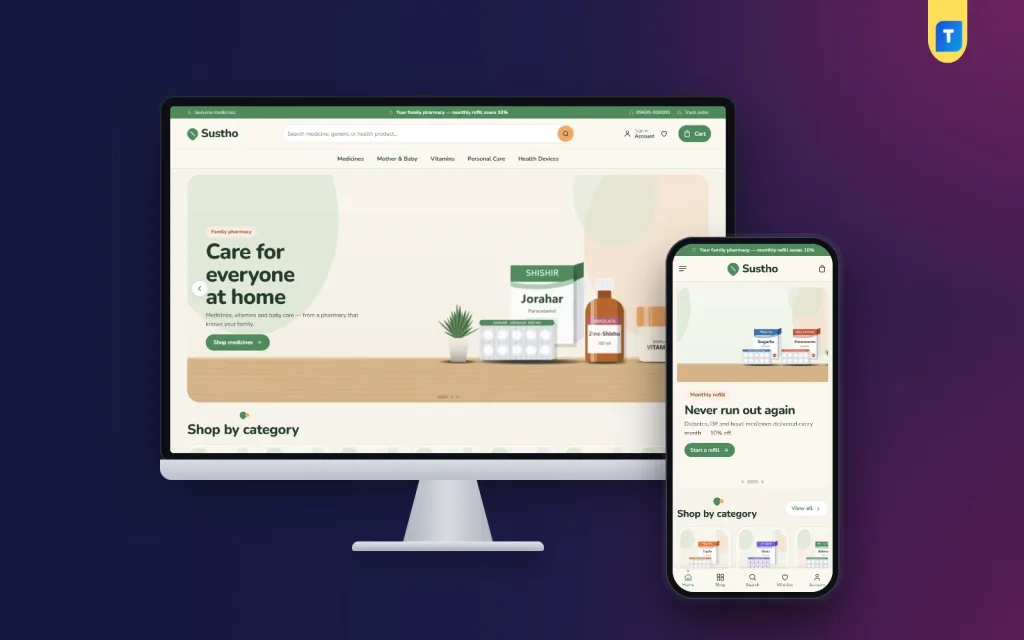
If you want a theme built around these ideas, Sustho is a warm family pharmacy WordPress theme for neighbourhood chemists. It uses sage, peach and cream, Nunito type and wooden-shelf photos, with category tiles and a curved footer.
It includes:
- Same medicine, better price: compare each company's version by price per unit, with a Best value badge on the cheapest.
- Monthly refill with dose, packs, bill and saving.
- Strength and pack variations with stepped prices.
- An Rx mark and prescription notice on Rx medicines.
- A facts card, disclaimer and delivery date on product pages.
- 24 homepage blocks, re-ordered with drag or arrows.
- bKash, Nagad, SSLCommerz and cash on delivery.
- 5 colour palettes, 4 font pairs and a one-click demo with 30 sample products from 6 companies.
The price block only lays out prices, and each product page still carries its own notice and disclaimer. All company names and pictures in the demo are invented. See the Sustho page for the live demo and full details.
Build trust with simple pages
A few short pages show that a real shop runs the site. Write them in plain language.
- About us: your story, the pharmacist's name and how long you have served the area.
- Licence and address: your licence details, shop photo and a map.
- How to order: steps for normal and prescription orders.
- Delivery and returns: what you can take back and what you cannot, for safety reasons.
- Medicine storage tips: short and general, with a note to follow the pack and the doctor.
These pages answer questions before customers ask, and they reduce calls to your counter. Strong website design for pharmacy shops treats such pages as part of the product, not as an afterthought.
Photos of the shop and the team
Add a real photo of your counter, your shelves and the pharmacist who will answer the phone. People feel safer ordering from faces they can picture. Keep the photos bright, honest and recent, and update them when the shop changes.
Common mistakes in pharmacy sites
- Showing one price for a medicine that has several pack sizes.
- Skipping the generic name.
- Making health claims that the pack does not make.
- Letting prescription items go through checkout with no review.
- Hiding the shop address, phone number or licence.
- Using photos that do not match the real pack.
- Leaving out-of-stock items open for order.
- Forgetting to test on a phone.
Poor website design for pharmacy projects usually fails on one of these points. Most of them come down to clear, honest information. A site that shows its details openly feels safer than one that hides them.
Launch checklist
- Check licence rules and write the legal pages.
- Each product shows brand, generic name, company, strength, pack and price.
- Rx items carry a visible mark and an ordering note.
- Price per unit is shown where packs differ.
- Payments and delivery are tested with a real order.
- Contact, address and licence appear in the footer.
- Pages load quickly on mobile data.
- Someone checks stock and prices each week.
After launch, keep a notebook of customer questions, and review it with your staff once a month. Ask the counter team which questions they answer most, then add those answers to the site. Each question is a hint for a page to improve.
If you want to read more on the technical side, the official WordPress documentation is a good, reliable reference.
Frequently asked questions
What does website design for pharmacy involve?
It covers site structure, search, product pages with strength and pack options, prescription handling, price display, payments, delivery rules and a mobile layout. The goal is a clear, honest and fast experience.
Can a small chemist afford website design for pharmacy?
Yes. A ready-made WordPress theme, a domain and hosting cost much less than a custom build. Spend your time on accurate product data and clear delivery rules.
What is medical store ecommerce website design?
It is the planning of an online medicine shop, with product fields, Rx marks, price per unit, checkout and delivery set up for medicine rather than general goods.
Should I show price per unit?
Yes. It lets customers compare a small strip with a large box, and it makes your pricing look fair.
Is cash on delivery fine for medicine?
Many customers prefer it. Offer it in areas you can reach quickly, and also offer bKash or Nagad for those who want to pay in advance.
How should I handle prescription medicine online?
Mark it as Rx, ask the customer to send the prescription by WhatsApp or call, and let your pharmacist check it before you confirm the order. Always follow your licence and the current rules.