Choosing the best SMTP plugin for WordPress is one of the quickest ways to stop losing emails. If customers say they never got an order confirmation, or your contact form messages vanish, the problem is often not your site. It is how WordPress sends mail by default.
This guide explains why emails go missing, what SMTP changes, and how to pick a plugin without wasting money. You will find a clear smtp wordpress setup in steps, a testing routine, a troubleshooting list and answers to common questions. It is written for shop owners and small teams in Bangladesh, but the steps work anywhere.
Why WordPress emails go missing
By default, WordPress hands every email to your hosting server through a basic mail function. That server sends the message with very little proof of who you are. Email providers such as Gmail and Outlook are cautious about messages like that.
The result can be any of these:
- The email lands in the spam folder.
- The email is dropped without any error on your side.
- The email arrives hours late.
- Some customers receive it and others do not.
You usually find out only when a customer complains. For a shop, that means unconfirmed orders and angry calls. For a service business, it means lost enquiries.
What SMTP is, in simple words
SMTP stands for Simple Mail Transfer Protocol. It is the standard way email servers talk to each other. When you send mail through SMTP, you log in to a real mail server with a username and password, and that server sends the message.
Think of it like posting a letter at a proper post office with your return address. The basic mail function is like slipping the letter under a door and hoping it reaches the right house.
With SMTP, the receiving server can see that the message came from a server you logged in to. That makes it far more likely to reach the inbox.
Which WordPress emails are affected
Many site owners think of email as only the contact form. In fact, WordPress sends more than that:
- Order confirmations and status updates from your shop.
- Contact form and enquiry messages.
- Password reset emails.
- New user and welcome emails.
- Admin notifications, such as new comments or new orders.
- Messages from other plugins that use the normal WordPress mail function.
If password reset emails fail, customers cannot log in. If order emails fail, they doubt that the order went through. Both are costly.
What to look for in the best SMTP plugin for WordPress
Most SMTP plugins do the same core job. The differences are in how simple they are and what else they try to sell you. Use this list to compare.
- Covers every email. It should handle all mail that goes through the WordPress mail function, not only one form plugin.
- Simple settings. Host, port, encryption, username, password and a From address. Nothing more is needed for most sites.
- TLS or SSL support. Encrypted connections protect your login details.
- A test email button. You should be able to prove it works in one minute.
- Works with your shop. Check that order emails are covered, whether you use a shop plugin or not.
- Clear pricing. Avoid paying a monthly fee for something that only stores a few settings.
- Light on your site. It should not add heavy pages or slow your dashboard.
Decide which two or three matter most for your business, since the best SMTP plugin for WordPress is the one that fits how you work. A busy shop needs order emails to work above all. A small blog just needs the contact form and password resets.
What you need before you start
An SMTP plugin does not create an email service. It sends through one you already have. Collect these details first:
- An email account on your own domain, such as hello@yourshop.com.
- The SMTP host name. Your email or hosting provider lists this in its help pages or control panel.
- The port number. Common choices are 587 for TLS and 465 for SSL.
- The encryption type: TLS or SSL.
- The username, which is often the full email address.
- The password for that email account.
Use an address on your own domain as the From address. Sending as a free webmail address through another server often causes problems.
A simple smtp wordpress setup, step by step
Once you have the details, the work takes about ten minutes.
- Install and activate your chosen SMTP plugin.
- Open its settings screen in the WordPress dashboard.
- Enter the SMTP host and the port.
- Choose TLS or SSL to match the port.
- Enter your username and password.
- Set the From address and the From name. Use your real shop or business name.
- Save the settings.
- Send a test email to an address you can check.
If the test email arrives, the setup is done. If it fails, check each field again. A small typo in the host or password is the most common cause.
Always send a test email
Never assume the settings work. Use the test email button, then check these things:
- Did the message arrive at all?
- Did it arrive in the inbox or in spam?
- Does the From name and address look right?
- Is the message readable on a phone?
Test with more than one address, for example a Gmail account and an address on another provider. Test again whenever you change your email provider, password or hosting plan. A password change at your provider is a very common reason that mail suddenly stops.
Common problems and quick fixes
If your test fails or mail still goes to spam, work through this list.
- Wrong port or encryption. Port 587 usually pairs with TLS, and port 465 with SSL. Mixing them fails.
- Wrong password. Reset it at your email provider and enter it again.
- Host blocks outgoing connections. Some hosting plans block certain ports. Ask your host which port they allow.
- From address does not match. Use an address on the same domain as the SMTP account.
- Missing domain records. Your domain should have proper SPF and DKIM records. Your email provider explains how to add them.
- Too many messages at once. Many providers limit how many emails you can send per hour or day.
Make one change at a time and test after each. That way you know which change fixed the problem.
If nothing works, contact your email provider and send them the exact error message from the test. Support teams can usually tell from the message whether the fault is a blocked port, a wrong login or a sending limit. Keep a copy of the message so you can show it to a developer if needed. Write down what you changed and when, because that record saves time later.
Email tips for shops in Bangladesh
Many shops here take orders through Facebook and then move to a website with bKash, Nagad or cash on delivery. Email is a small part of that flow, but it matters.
- Send an order confirmation every time. Customers who pay by cash on delivery still like proof of their order.
- Ask for a working email at checkout, and show a note that says to check spam.
- Keep the message short. Include the order number, items, total and delivery address.
- Add your phone number or WhatsApp in the email so customers can reach you quickly.
- Use your own domain address, not a free webmail address, in the From field.
- Place a test order yourself every few weeks and watch the emails arrive.
A ready-made option: Mail & SMTP
If you want a small plugin that does the job and nothing extra, Mail & SMTP is one option. It sends every WordPress email through your SMTP server instead of the basic mail function of your host.
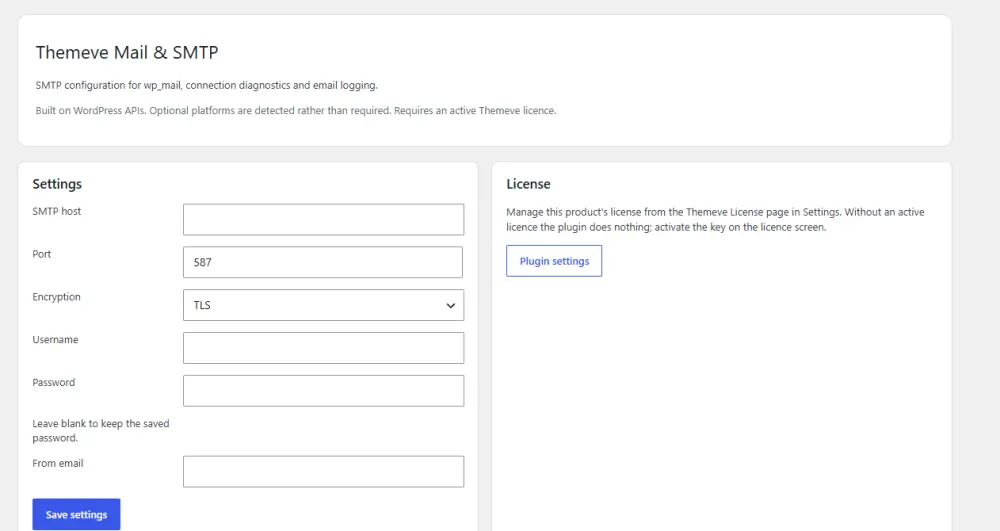
The settings screen covers what you need:
- Host and port.
- TLS or SSL encryption.
- Username and password login.
- Your own From address.
- A test email button.
It covers order emails, form messages and password resets, plus other plugins that use the normal WordPress mail function. It works on any WordPress site, with WooCommerce, Themeve Commerce or no shop at all. See the details on the Mail & SMTP product page.
Remember that it is only the sender. You still need an email account or SMTP service from your own provider.
Checklist for picking the best SMTP plugin for WordPress
- List every email your site sends today.
- Confirm you have an email account on your own domain.
- Collect the host, port, encryption, username and password.
- Pick a plugin with a test button and a simple screen.
- Check that SPF and DKIM records are in place.
- Send tests to two different providers.
- Place a real test order.
- Repeat the test after any change to hosting or passwords.
With this list done, you will know that the best SMTP plugin for WordPress, for your site, is the one that passes all the tests.
Where should the mail actually come from?
The plugin only passes your message on. The mail server behind it matters just as much. You have three common choices, and each suits a different kind of site.
- Your hosting email. Most hosting plans include email accounts on your domain. This is the easiest start, and fine for a small shop with few messages a day.
- A business email service. A paid email plan from a known provider gives you better storage, support and a proper inbox. It suits teams that also read and reply to customer mail.
- A dedicated sending service. These are built for sending many messages, such as order emails from a busy shop. They cost more and need a little more setup.
Start small. If your site sends fewer than a few hundred emails a day, hosting email or a business email plan is usually enough. Move to a sending service only when you see limits or delays.
Whichever you pick, keep one rule: the From address on your site should belong to the same domain as the mail account. This one habit prevents many spam problems.
How many emails does a small shop send?
Count a few messages for each order: one to the customer, one to you, and sometimes a status update. A shop with twenty orders a day sends well under a hundred emails. Contact forms and password resets add only a few more. Check your provider limits against that number and you will know if you are safe.
What about newsletters?
Do not send newsletters through your normal site mail. Bulk marketing needs its own tool. Keep your SMTP account for the messages that customers expect, such as orders and password resets.
Security and good habits
Your SMTP password is a key to your email account. Treat it with care.
- Use a strong password that you do not use anywhere else.
- Prefer TLS or SSL, not an unencrypted connection.
- Limit who has access to your WordPress dashboard.
- Change the password if a staff member leaves.
- Keep WordPress and your plugins updated.
- Watch for unusual activity in your email account, such as messages you did not send.
- Keep a note of your SMTP details in a safe place, so a new developer can restore the setup quickly.
These habits cost nothing and protect both your customers and your business reputation. Review them once every few months, or whenever someone with access to the site changes role.
If you want to read more on the technical side, the official WordPress documentation is a good, reliable reference.
Frequently asked questions
What is the best SMTP plugin for WordPress?
The best one is simple, covers every WordPress email, supports TLS or SSL and has a test email button. Match it to your needs and avoid paying for features you will not use.
Do I need an SMTP plugin if my emails already arrive?
If every email reaches the inbox, you may be fine. But arrival can change without warning, so many owners switch to SMTP before a problem appears.
Can I use a free Gmail address for SMTP?
You can, but limits and security rules apply, and a business address on your own domain is a better choice. It looks more professional and causes fewer problems.
Why do my emails still go to spam?
Check your SPF and DKIM records, the From address, and the content of the message. Spam filters dislike long lists of links and shouting capital letters.
How do I choose the best SMTP plugin for WordPress for a shop?
Make sure it covers order emails, password resets and form messages. Then test with a real order. A plugin that passes a real order test is a good fit.
Does SMTP make my site slower?
Not in any way your visitors would notice. The plugin only acts when an email is sent.
Is a smtp wordpress setup hard for a beginner?
No. You need six details from your email provider, and the steps take about ten minutes. The test email button tells you quickly if something is wrong.