 −50%
Consent & Privacy Manager – Cookie Consent Plugin for WordPress
✦ Key features
- Cookie banner with your own text
- Link to your privacy policy
- Accept button
- Reject optional cookies button
- Choice remembered for 180 days
- Banner stops appearing once a choice is made
- Fixed banner at the bottom of the screen
- Labelled dialog for screen readers
- Light inline code, no script file
- One simple settings screen
- Works with any WordPress theme
- No outside subscription service
Overview
Consent & Privacy Manager is a cookie consent plugin for WordPress that shows a short banner in your own words, with a privacy policy link and two buttons: Accept and Reject optional cookies. The choice is remembered for 180 days.
Consent and Privacy Manager is a cookie consent plugin for WordPress that adds a clear banner in your own words. It has a privacy policy link and two buttons: Accept and Reject optional cookies. The visitor's choice is remembered, so the banner does not keep coming back.
It is made for shop owners, bloggers and business sites that want a short, honest cookie notice without a subscription service or a heavy script. You write the text, add your link and switch it on. That is the whole setup.
Who can use Consent and Privacy Manager
If you want cookie consent for WordPress without a heavy setup, this plugin is made for you. It works on any WordPress site and with any theme. It does not need WooCommerce. It suits:
- Online shops that run Facebook or Google ads.
- Blogs and news sites that use analytics.
- Business sites that want to look professional to clients abroad.
- Portfolio and service sites that keep visitors' details in a contact form.
- Agencies who set up many small sites and want one simple banner for all of them.
Why visitors expect a cookie banner
Most websites use cookies. They keep shoppers signed in, remember a cart, count visits or measure ads. Visitors increasingly expect to be told, and to have a say. A short banner shows that your site respects them.
If you sell to buyers abroad, or run ads that rely on tracking, a notice is often part of the rules you are asked to follow. Even for local sites, clear communication builds trust.
Front-end: what your visitors see
The banner is a small box fixed to the bottom of the screen, with a margin on the left, right and bottom. It has a white background, dark text, a thin border, rounded corners and a soft shadow. It contains:
- Your notice text.
- A Privacy policy link, shown when a policy address is set.
- An Accept button.
- A Reject optional cookies button.
The banner is marked as a dialog with the label Cookie consent, which helps screen readers. It shows on the public pages of your site and never inside the WordPress dashboard.
What happens when a visitor chooses
- The banner closes at once.
- The plugin saves the choice in a browser cookie named tvx_consent, with the value accept or reject.
- The cookie lasts 180 days.
- While that cookie exists, the banner is not shown again on any page.
Back-end options of the cookie consent plugin for WordPress
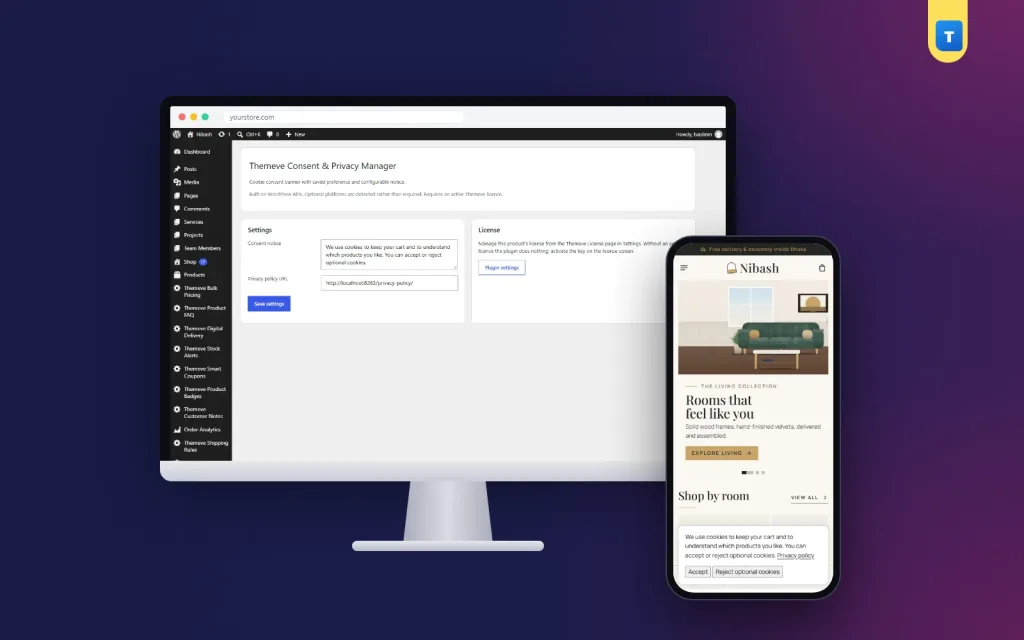
Open Settings › Themeve Consent & Privacy Manager. The screen has a Settings card and a License card.
Consent notice
- A text box for the message shown in the banner.
- The default text is: We use cookies to improve your experience.
- Write it in any language, including Bangla, or in two languages together.
- Plain text only. Markup is removed for safety.
Privacy policy URL
- A web address field for the link shown in the banner.
- If you have set a privacy page in WordPress, its address is filled in for you.
- Leave it empty and the link is not shown.
License card
- A link to the licence screen, where you activate or check your licence.
- Without an active licence, no banner is shown. Only the lock screen and the licence screen open.
Save settings
One button saves the text and the link. The banner updates on the next page load.
Write a friendly banner
Because the text is yours, the banner can match the tone of your site, whether that is formal, friendly or bilingual. Keep it to one or two sentences. Say what cookies you use and why. Avoid scary words.
For example: We use cookies to keep your cart and to understand how visitors use our site. Check it on a small screen to be sure it does not cover your Buy button or your menu.
What a banner can and cannot do
A cookie banner tells visitors what you do and records their choice. On its own, this plugin does not block other scripts. If you add analytics or ad tracking, decide how your site should respect a Reject choice, and set those tools up accordingly. The saved cookie tells you which choice the visitor made.
A banner alone does not make a site legally compliant. Laws differ by country, so check what applies to your business, and keep your privacy policy accurate.
Write a good privacy policy
Your banner links to a privacy policy, so the page must exist and be honest. Explain:
- What data you collect, such as names, phone numbers and delivery addresses.
- Why you collect it.
- Which tools you use, such as analytics or ad pixels.
- How people can contact you about their data.
Plain language works better than legal jargon.
How the cookie consent plugin for WordPress remembers a choice
The choice is stored in the visitor's own browser, not on your server. This has a few effects you should know about:
- If the visitor clears cookies or uses a new browser, the banner appears again.
- A visitor on a phone and a laptop will see the banner once on each device.
- Private windows start fresh, so you can test the banner at any time.
- The plugin does not keep a list of who accepted or rejected.
Speed and lightness
- One small piece of inline code handles the two buttons. No separate script file is loaded.
- No stylesheet file is loaded on the front end.
- No outside service, tracker or subscription is involved.
- Nothing is loaded in the banner once a visitor has chosen.
Banner text ideas
Short is better. Here are three plain examples you can adapt.
- For a shop: We use cookies to keep your cart and to see which pages are useful.
- For a blog: We use cookies to count visits and improve our articles.
- For a business site: We use cookies to make this site work and to measure its use.
Avoid long legal sentences. The link to your policy is the place for details.
A practical example
A craft shop sells to buyers in Bangladesh and abroad. The owner writes a two-sentence notice, links the privacy page and saves. Visitors see a calm message at the bottom of the screen, choose once and carry on shopping.
Review it now and then
Good cookie consent for WordPress is not a one-time job. Set a reminder and look at it again.
- Every few months, read your banner and privacy policy again.
- If you added a chat widget, an analytics tool or an ad pixel, mention it.
- If you stopped using one, remove it from the text.
- Ask a friend to read the banner on their phone. If they hesitate, make it simpler.
Setup steps
- Go to Plugins › Add New › Upload Plugin and choose the plugin zip.
- Click Install Now, then Activate.
- Open My Account on the store where you bought it, copy your licence, and activate it on the plugin's licence screen.
- Open Settings › Themeve Consent & Privacy Manager.
- Write your consent notice.
- Check the privacy policy link, or paste the address of your policy page.
- Click Save settings.
- Open your site in a private window to see the banner.
Updates arrive in Dashboard › Updates while your licence is active.
Why choose it over a large consent suite
Many sites only need a simple cookie consent plugin for WordPress, not a full privacy platform.
- It is deliberately small: one banner, your text, your link, two buttons.
- There is no complex dashboard to learn.
- No monthly fee to an outside consent service.
- It works with any theme and does not need WooCommerce.
A large suite can scan your site and block scripts by category. This plugin does not. If you only need a clear notice and a remembered choice, the simpler tool is quicker to set up and easier to keep up to date.
Works well with other Themeve plugins
If you add tracking code to your site, Global Code Manager lets administrators add header and footer code with an on or off switch. SEO Manager adds an SEO title, meta description, canonical address and robots setting to each post. Each is a separate plugin, so you add only what you need.
Questions buyers ask before they install
Can I change the colours or the position of the banner?
No. The banner has a fixed look: a white box at the bottom of the screen. You control the text and the link.
Can I change the button names?
No. The buttons are called Accept and Reject optional cookies.
Can visitors change their mind later?
Not through a settings link. They would need to clear the cookie in their browser.
Does it work with page caching?
The banner is added to the page and hidden by the visitor's cookie check on the server. If your caching plugin serves the same page to everyone, test in a private window after setup.
Requirements
- WordPress 6.2 or newer, tested up to WordPress 7.1.
- PHP 7.4 or newer.
- An active licence for this plugin.
What is included
- The plugin zip, ready to upload from Plugins › Add New.
- Your licence, shown in My Account after payment.
- Updates in Dashboard › Updates while the licence is active.
- Documentation after purchase.
- Support for six months through WhatsApp.
Delivery is instant after your payment is checked. Pay with bKash, Nagad or Rocket, enter your Transaction ID, and the download appears in your account. A clear cookie consent plugin for WordPress is a small step that tells every visitor you take their privacy seriously.
Consent & Privacy Manager is built on the official WordPress documentation standards, and you can browse more of our WordPress plugins.
Reviews
0.0
Write a review
★★★★★
0 reviews from buyersNo reviews yet — be the first to share your experience after buying.
Frequently Asked Questions
01What does a cookie consent plugin for WordPress do?
It shows visitors a notice about cookies and records their choice. Consent & Privacy Manager shows your text, a policy link, and Accept and Reject buttons.
02Is this cookie consent plugin for WordPress enough to be legally compliant?
Not on its own. Laws differ by country, so check what applies to your business and keep your privacy policy accurate.
03Can I write the banner text myself?
Yes. The text is yours, and you can add a link to your privacy policy.
04What buttons does the banner show?
Accept and Reject optional cookies.
05Is the visitor choice remembered?
Yes. It is saved in a browser cookie for 180 days, and the banner does not show again while it exists.
06Does it block analytics or ad scripts automatically?
No. It shows the banner and records the choice. It does not block other scripts by itself.
07Does it work with any theme?
Yes. It works on any WordPress site.
08Does it need a licence?
Yes. Without an active licence no banner is shown, and only the lock and licence screens open.
Delivery & Support
1Place your orderAdd to cart, sign in and pay with bKash or Rocket.
2Payment verified automaticallyEnter your Transaction ID — the payment is matched automatically, usually within seconds.
3Get your productYour license key and download appear in My Account → Licenses.
- Secure automatic payment verification
- Delivery to your account & e-mail
- Friendly WhatsApp support
Refund Policy
This policy applies to every product in our store.
You get a refund when the product does not work as described and we cannot fix it, when your license will not activate your website, or when a manually delivered product is late and you cancel before delivery. A working license, or a single license already used on a live domain, is not refundable. Approved refunds go back to the number you paid from within one working day, minus the Send Money charge.
More items
View all →You may also like
−50%
 −50%
 −38%
 −27%
Plugins
Elementor Pro Plugin 1 Year with Library Access – Elementor Pro Buy in Bangladesh
৳400
৳550Save −27%
