Sales report meaning is simple: it is a document that shows what your business sold during a chosen period, such as a day, a week or a month. It turns a pile of separate orders into a few clear numbers that you can read in a minute.
Many small shop owners in Bangladesh keep sales in a notebook, a Facebook inbox or a spreadsheet. That works for ten orders a week. It stops working when orders come from many places and you need to know, quickly, whether the month is going well. This guide explains what a sales report is, what it should contain, and how to read and use one.
Sales report meaning in plain words
A sales report is a summary of sales over a set time. It answers a few basic questions. How much did we sell? How many orders did we get? What did people buy? How did they pay? How many orders went wrong?
If you are asking "what is a sales report in business", think of it as a scoreboard. A match has a final score, and a shop has a sales total. The report does not make sales for you. It tells you what already happened, so that you can decide what to do next.
A good report has three qualities:
- It covers a clear period, with a start date and an end date.
- It uses the same rules every time, so last week and this week can be compared fairly.
- It is short enough that you actually read it.
Why the sales report meaning matters for online shops
Without a report, you run the shop on feeling. A busy week feels good even if the profit was small. A quiet week feels bad even if the orders were large. Numbers remove that guesswork.
Here is what a regular report helps you do:
- Spot a drop in sales early, before it becomes a problem.
- See which products bring in the most money.
- Check whether a Facebook ad or an Eid offer really worked.
- Plan stock, so you do not run out of the best sellers.
- Find out how many orders are cancelled or returned.
- Show a partner, a bank or an investor how the business is doing.
Even a one-person shop gains from this. The habit matters more than the size.
The main parts of a sales report
Reports differ, but most good ones share the same core parts. Learn these and you can read almost any report.
- Sales value. The total money from valid orders in the period.
- Number of orders. How many separate orders came in.
- Average order value. Sales value divided by the number of orders. It tells you how much a typical buyer spends.
- Order status counts. How many orders are completed, still in progress, cancelled or returned.
- Top products. The items that brought in the most money or sold the most units.
- Payment methods. How buyers paid, for example bKash, Nagad, card or cash on delivery.
- A trend line. Sales shown day by day, so you can see the shape of the period.
Some reports add extra items, such as new customers or refunds. Start with the seven above. They cover most of what a small shop needs.
Sales report and other reports: what is the difference
New shop owners often mix up reports, and the sales report meaning gets lost. A sales report is about money coming in from orders. An inventory report is about stock on the shelf. A profit report subtracts costs. A customer report is about who buys and how often.
Each one answers a different question, so use them together. The sales report is the best place to begin, because every other report depends on knowing what you sold. Once the meaning is clear, the rest are easy to add.
Types of sales reports
There is more than one kind of report. The right one depends on your question.
Daily and weekly reports
These are quick checks. A daily report tells you how today is going. A weekly report smooths out the ups and downs, because one slow day matters less when you look at seven.
Monthly reports
A monthly report is the main record for most shops. You use it for planning, for tax records and for comparing against last month or last year.
Product reports
These show sales by item. They help you decide what to restock, what to discount and what to stop selling.
Payment and status reports
These show how people paid and what happened to their orders. For a shop that accepts cash on delivery, the status report is very important, because returned parcels cost real money.
How to read a sales report step by step
Numbers only help if you know what to look at. Use this order every time.
- Check the period. Make sure the dates are what you expect.
- Look at the sales value. Is it higher or lower than the last period?
- Look at the number of orders. Did sales change because you got more orders, or because each order was bigger?
- Check the average order value. A rise means buyers are adding more items to the cart.
- Read the status counts. Many cancelled or returned orders mean something is wrong with the product, the price, the delivery or the buyer.
- Scan the top products. Do they match what you promote?
- Check the payment methods. If most buyers choose cash on delivery, think about how to reduce returns.
This takes five minutes and gives you a clear picture. Write down one thing to try next week.
Sales report meaning in practice: a small shop example
Take a shop that sells kurtis and orders through a website. In one week it receives 40 orders. Thirty-two are completed, four are still being packed and four are cancelled or returned. The sales value from valid orders is 96,000 taka.
The average order value is 96,000 divided by 36 valid orders, which is about 2,667 taka. Last week it was 2,100 taka. The owner learns two things. Buyers are spending more, and one in ten orders is lost. The first is good news. The second needs attention.
The owner then checks the status report and sees that most returns are from one district, paid by cash on delivery. The next step is clear: confirm those orders by phone before dispatch, or ask for an advance payment. Without the report, this pattern would stay hidden.
Where the numbers come from
A report is only as good as its source. In an online shop the source is the order list. Each order has a date, a status, a total, a payment method and the products bought. The report adds these up for the period you choose.
That is why order status matters so much. An order marked completed is a real sale. An order marked cancelled or failed is not. An unfinished checkout is only a visitor who changed their mind. If your tool counts all three as sales, the report gives a false picture. Before you trust any figure, ask which statuses are counted.
Orders also arrive from many places. Some come from the website, some from a Facebook message that you typed in by hand. Keep them in one system if you can, so that the report sees everything.
Common mistakes when reading sales figures
- Counting cancelled orders as sales. This makes the month look better than it was.
- Counting unfinished checkouts. A draft order is not a sale.
- Comparing different periods. A 30-day month and a 28-day month are not equal. Compare like with like.
- Mixing currencies. If you sell in two currencies, adding them together gives a wrong number.
- Looking only at the total. A good total can hide a falling product or a rising return rate.
- Checking too rarely. A report read once a quarter finds problems too late.
Sales report meaning and timing: how often to check
Match the habit to your shop size.
- Every evening: a quick look at today's sales and order status.
- Every week: a fuller review. Compare with the week before.
- Every month: a record for planning, stock and accounts.
- After every campaign: check the exact dates of the offer or ad.
Pick one day, for example Saturday morning, and keep it. Regular checks catch small changes while they are still easy to fix.
Making a sales report: spreadsheet or plugin
You can build a report by hand. Export orders, paste them into a spreadsheet and add formulas. This is free and flexible. It also takes time, and one wrong formula spoils every figure.
A reporting plugin does the same work inside your store admin. It reads the orders directly, so the numbers are always current. Look for these points when you compare options:
- It excludes cancelled, failed and draft orders from sales.
- It lets you choose date ranges quickly.
- It shows order status and top products.
- It can export a CSV file for your accountant.
- It keeps order data on your own site.
A ready-made option: Order Analytics
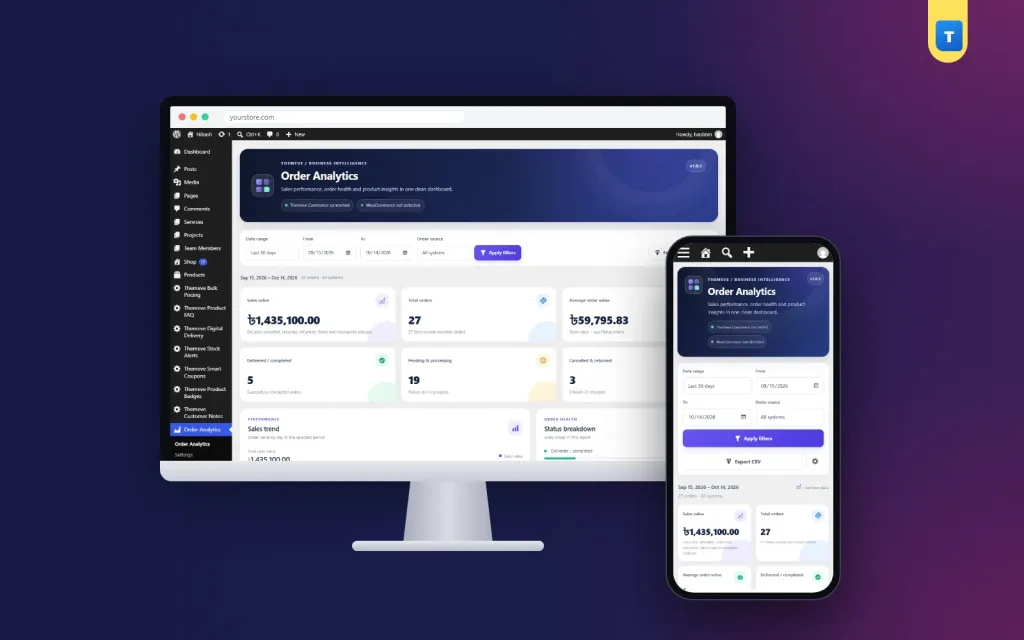
If your shop runs on WordPress, Order Analytics is one simple way to get these reports. It adds one page to your admin menu and reads WooCommerce orders, Themeve Commerce orders, or both together.
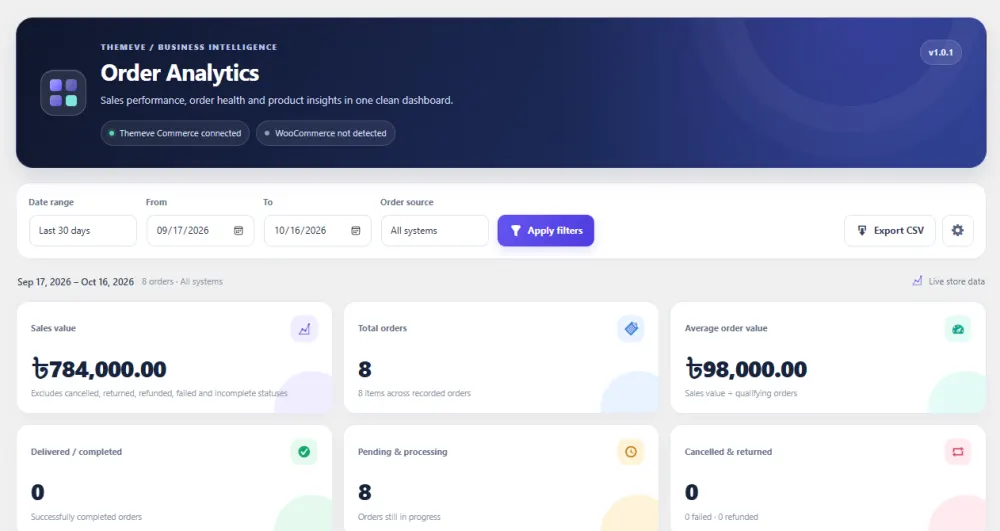
The cards at the top show sales value, total orders, average order value, completed orders, in-progress orders and cancelled or returned orders. Below them you get a sales trend chart, an order status breakdown, top products and a payment method summary.
You can choose a preset such as today, last 7 days or this month, or set your own dates, for example the ten days of an Eid campaign. Cancelled orders and unfinished drafts are left out of sales, and any range can be exported as a CSV file. No order data is sent to outside services.
Using your report to make decisions
A report is only useful if it changes something. After each review, choose one action.
- If one product leads, make sure it is always in stock and easy to find.
- If a product sells little, try a better photo, a clearer title or a small discount.
- If returns are high, call buyers before dispatch or ask for an advance on large orders.
- If the average order value is low, offer a bundle or a free delivery limit.
- If an ad did not lift sales, change the offer rather than only the budget.
Small changes, repeated week after week, add up. The report shows whether they worked. If you want to try this routine on your own orders, Order Analytics keeps every figure on one screen.
What a good report does not tell you
Even when the sales report meaning is clear to you, a report has limits. It shows what happened, not why. If sales fell, the report cannot say whether the cause was price, stock, a slow website or a competitor. You still need to look, ask buyers and test changes.
It also does not show profit. A product with high sales may have a thin margin once you pay for stock, packing, delivery and ads. Use the report as the first step, then check costs before you decide to push a product harder.
Finally, a short period can mislead. Three good days do not make a trend. Look at several weeks before you change prices or drop an item.
A quick weekly checklist
- Set the date range to the last 7 days.
- Write down sales value, orders and average order value.
- Compare with the week before.
- Count cancelled and returned orders.
- Note the top three products.
- Check how buyers paid.
- Choose one action for the coming week.
- Save or export the figures for your records.
If you want to read more on the technical side, the official WordPress documentation is a good, reliable reference.
Frequently asked questions
What is the sales report meaning in simple terms?
The sales report meaning is a summary of what you sold in a set period. It shows total sales, the number of orders and often the best products. It helps you understand how the business is doing.
What is a sales report in business used for?
It is used to track progress, plan stock, judge marketing and spot problems early. Owners, managers and accountants all use it to make decisions with facts instead of guesses.
Is a sales report the same as a profit report?
No. A sales report shows money coming in from orders. A profit report also subtracts costs such as stock, delivery and ads. You need sales figures first, then costs, to work out profit.
How is average order value worked out?
Divide the total sales value by the number of valid orders. For example, 50,000 taka from 20 orders gives an average order value of 2,500 taka.
Should cancelled orders be counted in sales?
No. Cancelled, failed and returned orders should be left out of the sales value. Show them in a separate count, so you can see how many orders were lost.
Why does the sales report meaning matter for small shops?
For a small shop, every order counts. Knowing the sales report meaning and reading one weekly shows you what sells, what returns and where to spend your effort and money.
Can I export a sales report for my accountant?
Yes. Most reporting tools, including Order Analytics, let you export a chosen date range as a CSV file that opens in any spreadsheet.